For Repairs and service of Large Format Printers and Plotters Call (786) 306-8825
About
Basic Printer Maintenance
October 8, 2015
Many printers will track things like pump cycles, how many trips the carriage makes across the printer, the number of ink drops that have fired through the printheads and more. Unfortunately, a lot of printers are unable to proactively warn us when a pump, wiper or capping station is failing or has failed—until it’s too late. But with a little preventive maintenance and knowing how to recognize the signs and symptoms of failing components you can save money on future repair costs and help mitigate unexpected downtime.
-
Read the Manual—Following the prescribed maintenance schedule listed in the printer’s manual can head off disaster and keep your printer running smoothly longer. Many printer manufacturers recommend replacing pumps and dampers at certain intervals; and suggest replacing other components like caps, wipers motors and the like after recommended for replacement after so much use.
-
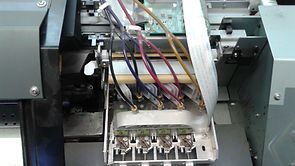
Dampers And Pumps—Symptoms of failing pumps often manifest as drop out: when nozzles seem to fire intermittently or not at all and repeated cleanings produce little result. While there can be a number of other causes for ink flow problems, making sure dampers and pumps are replaced as recommended goes a long way in eliminating the basics.
-
Wipers—Made of rubber or plastic, the wiper is sometimes mounted on the pump or within a separate assembly, usually positioned to the left of the printheads when they are docked. While wipers are often ignored, they actually play a critical role in keeping the printheads clean. By wiping the underside of each printhead, the wipers prevent ink buildup that would eventually clog or deflect the nozzles. Symptoms of bad wipers include overspray, fuzzy or missing nozzles and even poor cleaning results.
-
Caps—As with wipers, a good seal between the heads and caps will make all the difference when performing cleanings and maintaining the heads when not in use. Check and clean the caps at the same time you do the wipers. There should be no traces of ink along the rim of each cap. Also check the rubber along the rim to make sure it has not been damaged and there is nothing preventing the caps from making a good seal with the heads.
-
Don’t Ignore the Signs—Random drops of ink, lines and over-spray are all symptoms that something likely needs cleaning or replacement. Don’t ignore these signs. By addressing issues as soon as they are noticed, you can prevent further damage to related printer systems
-
We are the one that you can count on when your printer or plotter brakes down so ...
Call us (786) 306-8825